Connecting to Figma REST API: Fetching Metadata and Why Export JSON Isn't Enough
2026-05-28
Connecting, fetching metadata, and why export JSON isn't enough
The screen looks identical to humans, but for machines it causes seriously distorted code output. So the first task is to dissect the design file — pick a core component like a button and see how clean the metadata you can actually extract. This experiment will tell you directly: do you need to clean up, and how much? If the results are surprisingly usable, the entire cleanup phase can be skipped. If it's a disaster, then you decide the scope.
Prerequisites
Two things to confirm first:
1. Check your team plan
- Confirm the team hosting the source file is not on the free (Starter) plan
- Figma's Dev Mode (and Dev Mode MCP) requires Professional or above
2. Enable Dev Mode MCP server
This feature is surprisingly hard to find — thankfully there's a search function
- Click the grape-like Figma icon in the top left, search
Devin Actions - Switch to Dev Mode
Below is the process of connecting to the REST API together with Claude Cowork. REST API is more primitive than MCP, but the official documentation is complete and the permission model is clear.
Step 1 | Fetch metadata via API
First, you need to generate access credentials:
-
Open Figma (browser or desktop both work)
-
Click avatar in top right → Settings
-
Select Security in the left sidebar
-
Find the "Personal access tokens" section → click Generate new token
-
Name it
design-token-experiment(anything works) -
Expiration: 90 days is enough
-
Scopes — check only these:
File content→ Read-onlyLibrary content→ Read-only (if available)Library assets→ Read-only (if available)- Click Generate
- The token is shown only once — copy the entire string immediately and pass it to Claude Cowork
Claude Cowork took the token, did several things with it, and reminded me to revoke it afterward.
I then asked it to verify the JSON file and organize it into a structured analysis document.
On the revoke question: Cowork was right to remind me — PATs should be single-use by default. But this time I intentionally held off — I still needed to go back and pull metadata for Secondary, Disabled, Input field, and other components. Once the full experiment is done, I'll revoke it.
Note to future readers: if the PAT is still active when you see this, please revoke it.
Step 2 | Pick a component
-
Paste the Figma link for the primary button to Claude Cowork
-
Select the primary button in the Figma file
-
Right-click → Copy/Paste as → Copy link to selection
Keyboard shortcut: select the component, then
Ctrl + L(Windows) /Cmd + L(Mac).The copied link looks like this:
https://www.figma.com/design/{file-key}/MockupFile...?node-id={node-id}
What the first data pull looked like
What came back was the raw metadata for the entire button page (saved separately as button-page-dump.json, 1.36 MB). I passed this dump back to Cowork for structured analysis. First-round observations:
1. 62% styled / 37% hardcoded
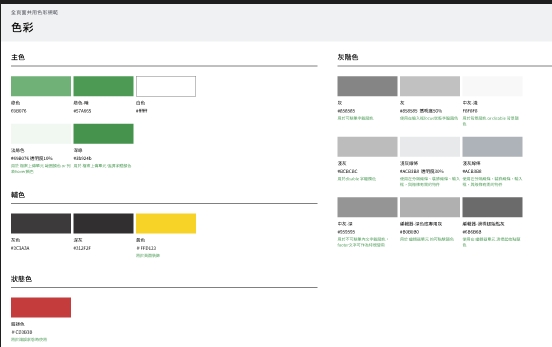
This Figma wasn't completely unorganized — three styles were in use (color/primary/主色, color/gray/白色, 綠色按鈕-陰影). The original designer had some token awareness. Maybe this is the true state of most design files: half done.
"Half organized" is actually harder to work with than "completely unorganized," because it gives the impression of rules while constantly violating them. When deriving tokens later, you have to assume any value might be a stray — you can't accept something just because it looks like a style.
2. Naming system disaster
When I converted this design file to code in the past, I already noticed the color values were messy and inconsistent with accessible contrast ratios...
- White was filed under gray (
color/gray/白色). If an agent reads this misclassification, it will invert it when generating dark mode — producing spectacularly ugly results - Four shades of green:
#69B076(primary),#429952(primary dark),#00A061(orphan green, 4 instances),#21BA52(orphan green, 2 instances). The first two were intentional; the last two are strays.
Validating tokens via API: the token consumption problem
With Claude Cowork's help, I started organizing primitive.tokens.json and semantic.tokens.json. But I quickly hit a bottleneck — the token consumption per conversation was too high. A 1.36 MB JSON dump is expensive to discuss and parse, with significant context initialization costs on every session.
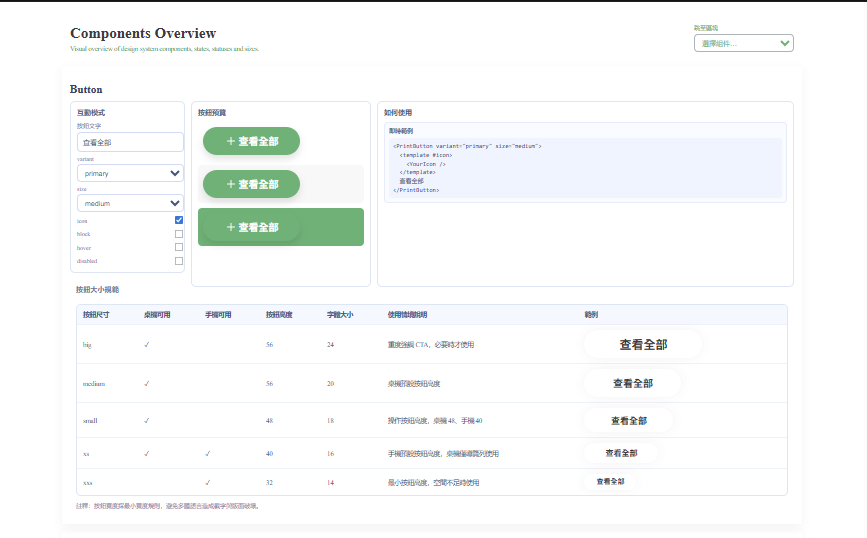
I shifted strategy: build a Vue × Vite environment in the project and validate and organize tokens directly in code, rather than relying on AI to do it step by step. Two advantages:
- Avoids repeated token consumption
- You can see what the component actually looks like in real time
API limitations: why the structure isn't machine-friendly
Once I started building the Vue component library, the core problem with this Figma became clear. Every time I tried to verify a design decision, I found the same issue — the REST API only gives you the final rendered result, not the design intent.
Concrete examples:
- Style references lost: the API returns resolved hex values (
#69B076), not "this button used thecolor/primary/主色style" - Variant structure missing: you can't see the component's variant logic, only a collection of independent frames
- Auto layout parameters invisible: spacing and padding logic is all hardcoded numbers — no rules to extract
This creates a paradox: the design file looks complete, but the structure the API exposes is useless for tokenization and AI comprehension.
Deriving trustworthy tokens from this raw data requires extensive manual verification and assumptions — exactly what I was trying to avoid.
Next: try Figma MCP
With the REST API's limitations now clear, it's time to test whether Figma MCP can improve the situation. Figma MCP claims to provide direct access to a design file's complete structure — not just rendered output, but the full metadata of the design.
If MCP can expose style references, variant logic, and auto layout parameters, then the entire token derivation pipeline might be salvageable. In the next post I'll document how that experiment went.