Cleanup Strategy: Extracting Trustworthy Tokens Without Rebuilding Figma
2026-05-26
When the design file is already a mess, how do you extract trustworthy tokens without rebuilding Figma?
My first instinct was to clean up the chaotic Figma file before moving forward. I quickly realized that was the wrong call — reconstructing a structurally broken file with no auto layout and inconsistent grouping logic would mean doing a designer's job, not the AI pipeline handoff I actually wanted to build.
That kind of cleanup is a bottomless pit. The first 80% goes smoothly, the last 20% is always chasing edge cases. And even if you finish, the next person to touch it may not have the same discipline — three months later it'll look the same again.
Design Engineering argues that tokens should live in code (a
tokens.jsonor DTCG file). If you clean up Figma first and then extract tokens from the clean version, you've left the source of truth inside Figma.
So I flipped the order: make "organizing tokens" the goal, and treat the current Figma as archaeological material rather than the source.
The flow becomes:
- Extract raw material from the existing Figma
- Define a clean
tokens.jsonandtokens.cssin code - Generate components and verify they match the design
- Validate that it can migrate into the actual codebase
The advantage: even if the next person has no Figma fluency, as long as the tokens exist, they — and any AI agent — can work directly from code.
How to Export Token Data from Figma
Figma can't export JSON directly — only PNG, SVG, or PDF. With a well-structured Figma file, MCP or the REST API can expose the structure before rendering. In practice, ideal structures are rare.
Three paths to get JSON:
1. Figma Desktop MCP
Select a component and call it directly from Claude Code / Cowork:
Use the figma-desktop MCP to fetch the raw structure of the selected component, save it as button-fresh-dump.json
2. REST API
If your PAT is still valid:
curl -H "X-Figma-Token: $TOKEN" \
  "https://api.figma.com/v1/files/{file-key}/nodes?ids={node-id}" \
  > button-fresh-dump.json
Parse file-key and node-id from the URL you get when right-clicking in Figma and choosing "Copy link to selection."
3. Plugin
Search Figma plugins for: Design Tokens
Select a component → run the plugin → download JSON.
The next two posts cover both approaches in practice:
- #3 — Connecting Figma: REST API — why the API alone isn't enough
- #4 — Connecting Figma: Figma MCP — how MCP filled the gap
Taking this design file's button as an example: all the right values are there — size, typeface, text color, background color — all defined in Figma. But after turning them into JSON, the output is full of hardcoded hex values and scattered style IDs: the same green appearing as four different hex codes, some styles that should have been registered as Figma styles weren't.
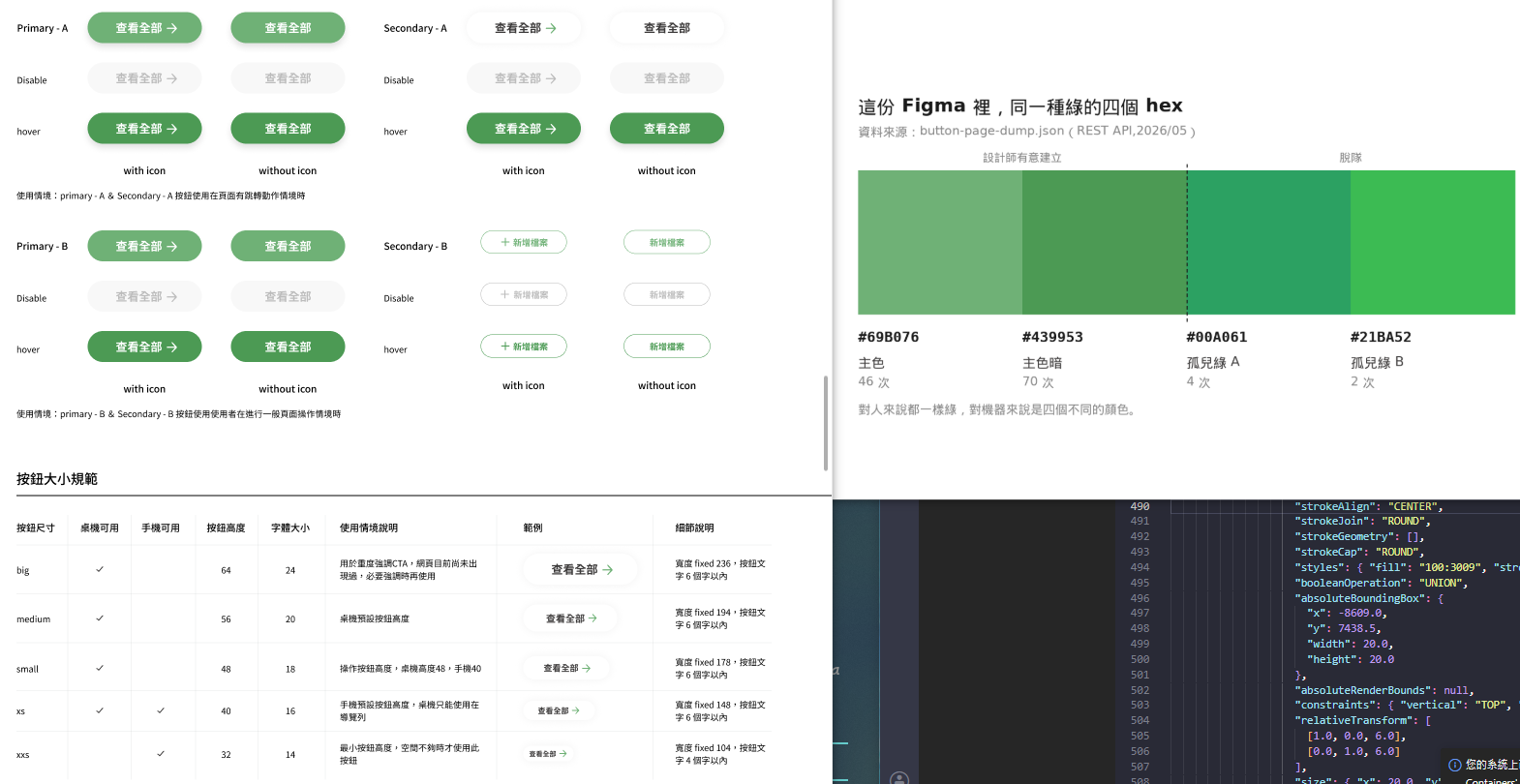
What a Well-Structured Figma File Looks Like
- The designer has deliberately created styles/variables (colour, type, and effect all have corresponding style IDs)
- The exported JSON says "this fill references style XYZ" rather than just the final rendered hex
- Given a style ID, the REST API can pull the entire reference network:
- Which style is this button's green?
- Where else is that style used?
For humans, both versions look identical in the canvas. For machines, the difference is enormous — structural usability is what determines whether token extraction can be automated.
This File Is in an Awkward Middle Ground
The structure exists, but it's not machine-usable.
I chose not to rebuild it. Instead I'm treating it as archaeological material and moving the source of truth to code. When this series is done, the goal is to have a tokens.json you'd trust to hand to an agent — no original designer required, no clean Figma required. The next person can start from code.